Building a Pickup-Only Order Intake and Mini-CRM for a Cottage Bakery
Replaced DM/text/notebook order tracking for my wife's bakery with a spam-guarded, server-validated intake flow and a single-admin dashboard she checks once a day.

RD Creations, my wife’s cottage-food bakery, was running its entire order book out of Instagram DMs, text threads, and a notebook by the register. It wasn’t a matter of order volume outgrowing her, it was that things were just hard to keep track of: details got lost between the DM and the oven, checking who had paid meant digging back through texts or payment app histories, and pickup times collided because nothing was written down in one place.
I built a pickup-only order intake site and a single-admin mini-CRM to give her a clean system of record. Here is how it’s structured, why I built it this way, and the technical trade-offs behind it.
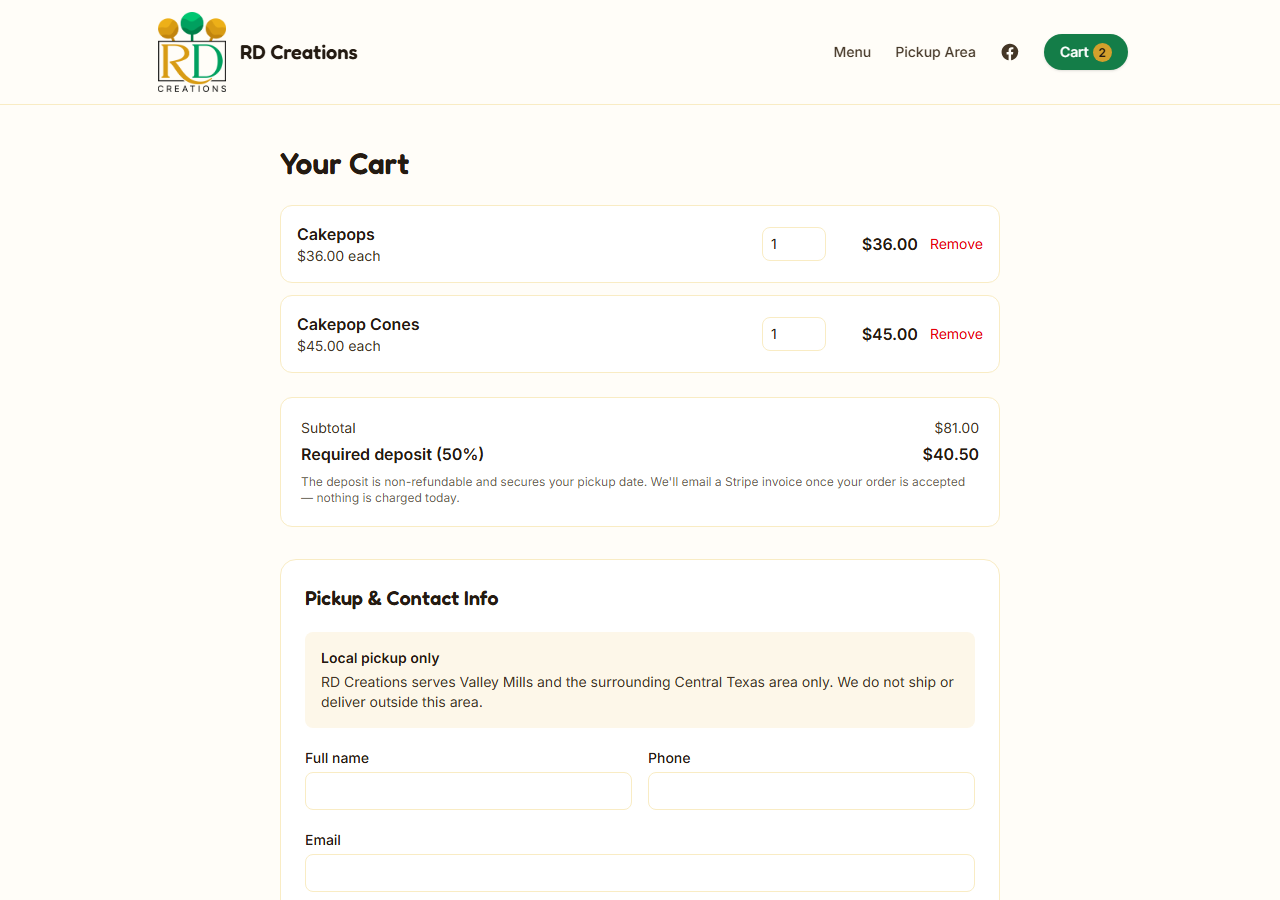
The client-facing checkout interface: clean, simple, stripped of bloated payment fields, and strictly locked to the client’s local service area.
The problem
Most businesses this size aren’t failing at marketing — they’re failing at logistics. They’re already making sales; they just can’t reliably track what was ordered, by whom, for when, and whether it’s been paid for. Off-the-shelf e-commerce platforms solve a problem they don’t have (real-time inventory, instant card checkout, shipping) while ignoring the one they do: everything is made to order, fulfillment is a scheduled local pickup, and payment happens out-of-band (meaning the platform coordinates and validates the order details, but the actual money moves directly through your existing cash, Venmo, or manual Stripe invoice workflows) — cash, Venmo, or a Stripe invoice sent after the fact, not a checkout form.
Why off-the-shelf tools didn’t fit
- Cottage-food laws & local focus — Texas laws restrict cottage bakers to direct local sales, so “no shipping, fixed service area” isn’t a limitation, it’s how the business is legally required to run anyway.
- Made-to-order catalog — Pre-orders for specific pickup dates, with a catalog that changes periodically without needing complex inventory tracking.
- Out-of-band payments — No SKU-level inventory to sync; payment happens via cash, Venmo, or manual invoice rather than instant card authorization.
The common thread: a one-person operation with no dedicated admin staff, collecting payment out-of-band. This custom build formalizes that workflow instead of forcing the bakery into tools built for retail chains.
Out of scope for this build: multi-location retail, real-time multi-SKU inventory, same-day/instant checkout expectations, or automated in-app payment processing.
What I built
Public site — browsable catalog with photos and availability, a persisted cart, and a single-page checkout that collects contact info, a pickup town restricted to a configurable service area, a pickup date, and a required consent/disclosure checkbox — no payment fields, no shipping form.
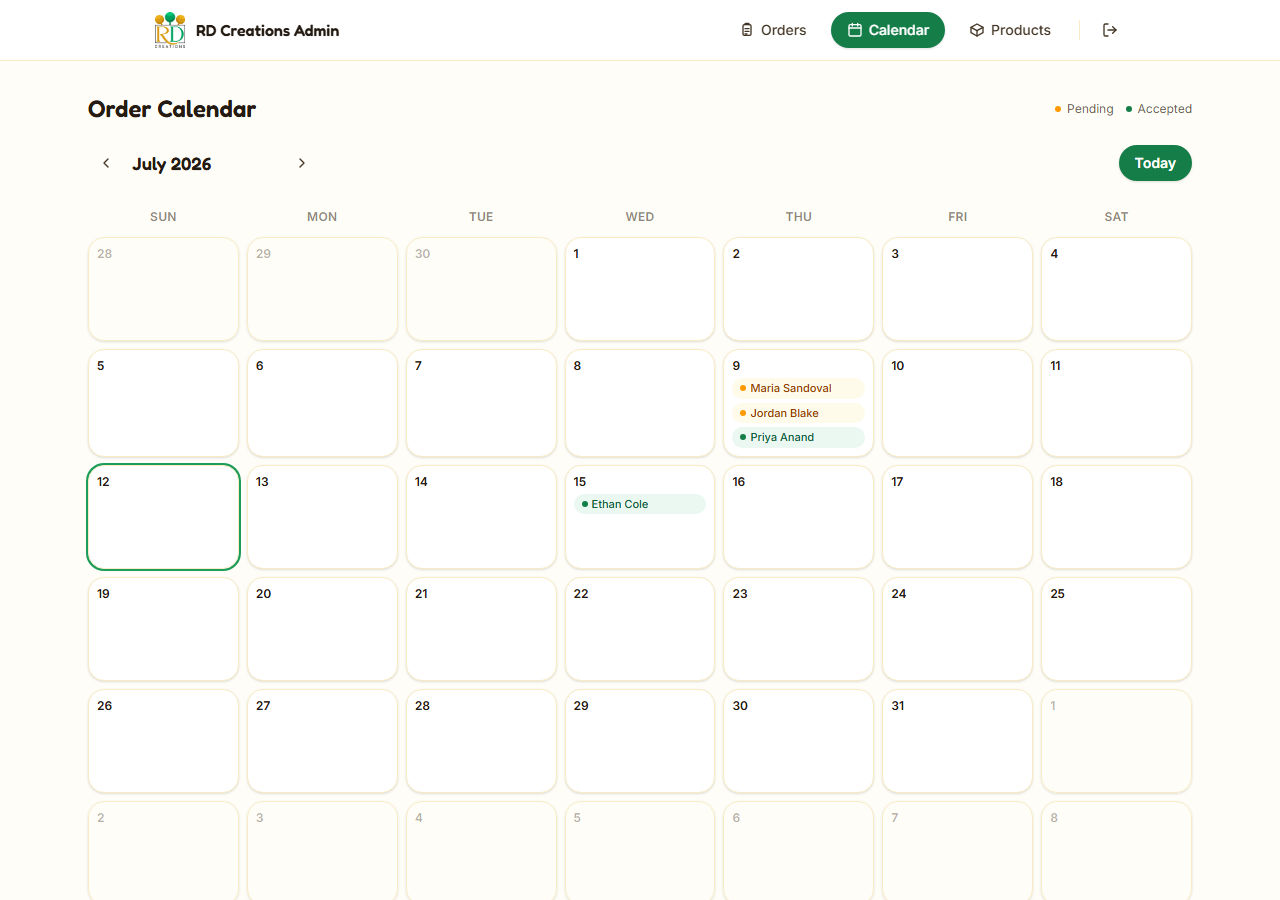
Admin / mini-CRM — password-gated dashboard behind a signed session cookie: an order ledger with inline status and payment-status controls, a calendar view for pickup-date load, full manual order create/edit for phone-in business, and drag-and-drop product-photo management. Nothing here assumes a second staff account or a POS terminal — it’s built to be run by one non-technical owner from a laptop or phone.
The connective tissue is a webhook, not a payment SDK. Accepting an order fires a signed event to an automation layer that generates and emails an invoice; the site itself never touches a payment processor, and every total is re-priced from the database server-side rather than trusted from the client:
interface IncomingOrder {
  items: { productId: string; quantity: number }[];
  pickupTown: string;
  pickupDate: string;
}

async function priceAndValidate(order: IncomingOrder, ctx: RequestContext) {
  const settings = await getSettings(ctx.db);
  if (!settings.serviceAreaTowns.includes(order.pickupTown)) {
    throw new OrderRejected('pickup_town_out_of_area');
  }

  const products = await getActiveProducts(ctx.db, order.items.map((i) => i.productId));
  const subtotalCents = order.items.reduce((sum, item) => {
    const product = products.find((p) => p.id === item.productId);
    if (!product) throw new OrderRejected('product_unavailable');
    return sum + product.basePriceCents * item.quantity;
  }, 0);

  const depositCents = Math.round((subtotalCents * settings.depositPercentageBps) / 10_000);
  return { subtotalCents, depositCents };
}
# outbound webhook contract — order.accepted
event: order.accepted
auth: HS256 JWT, 60s expiry, signed per-request
payload:
orderId: string
customerEmail: string
subtotalCents: number
depositCents: number
pickupDate: string
consumer: n8n workflow — see "The automation layer" below for the full breakdown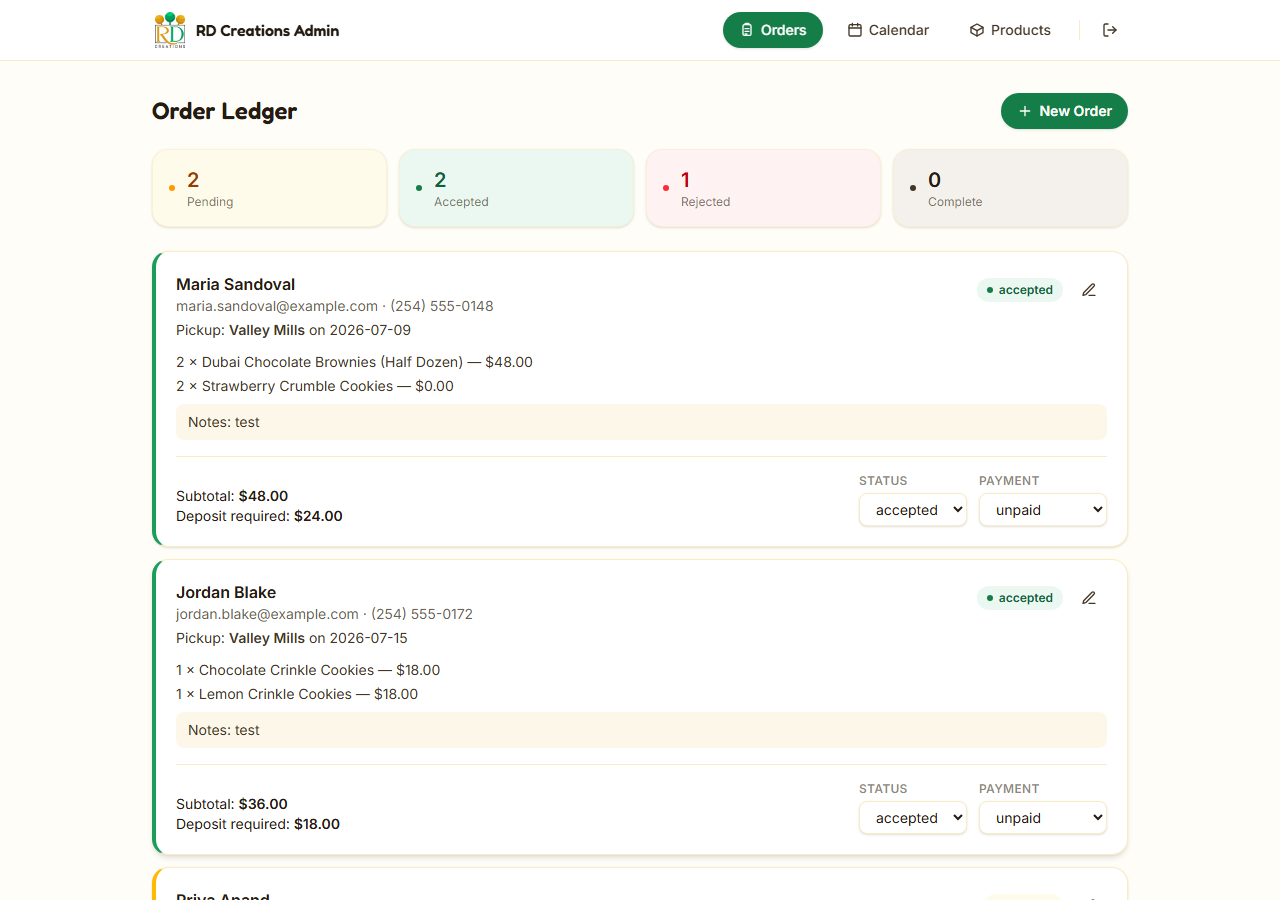
The single-admin dashboard: an ultra-clean order ledger giving the business owner an instant snapshot of pending operations from their phone.
The automation layer
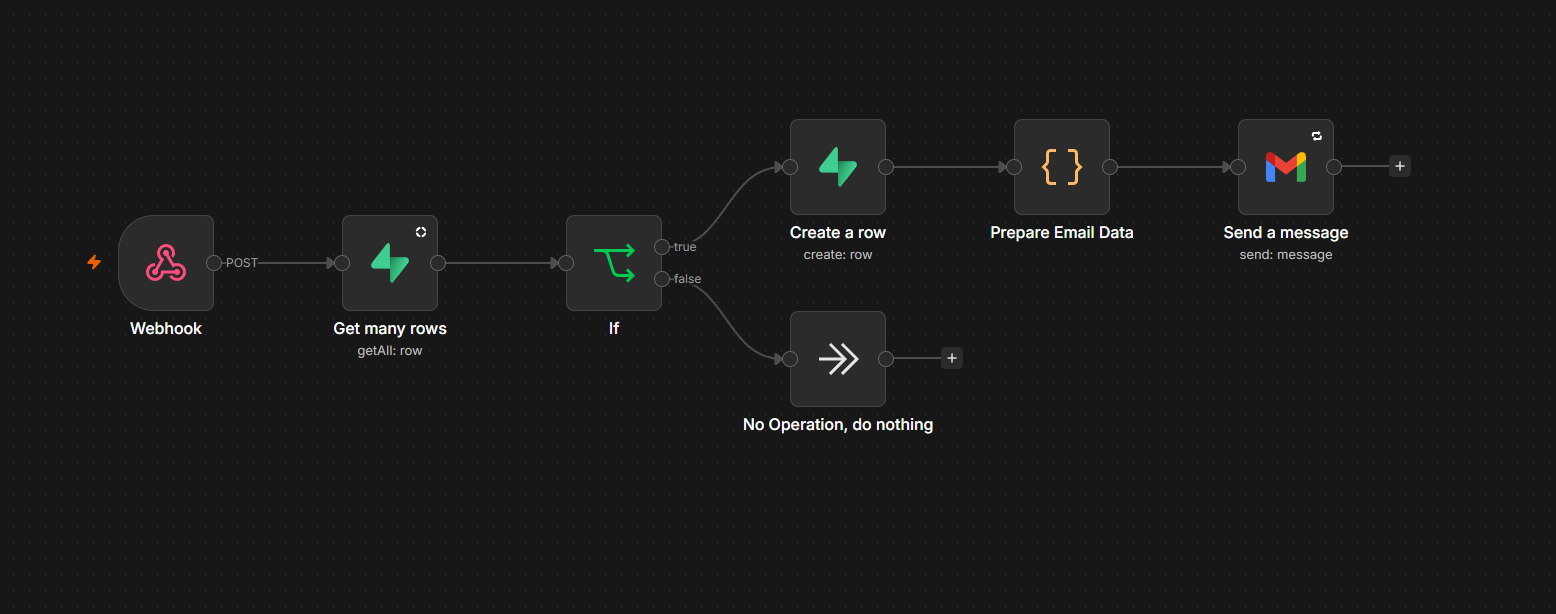
The site’s job stops at “validate the order and store it.” Everything that happens next — telling the owner, telling the customer, following up after pickup — runs in n8n, triggered by the signed webhooks above. Three workflows cover the full lifecycle of an order:
1. Order intake alert. The moment a customer submits an order, the intake webhook fires and n8n formats it into a plain-language summary — customer, items, pickup date, subtotal, deposit — and pushes it to the owner over Telegram and email within seconds. The value here isn’t glamorous, but it’s the difference between checking a dashboard out of habit and knowing the instant a sale happens, from a phone, without opening the site at all.
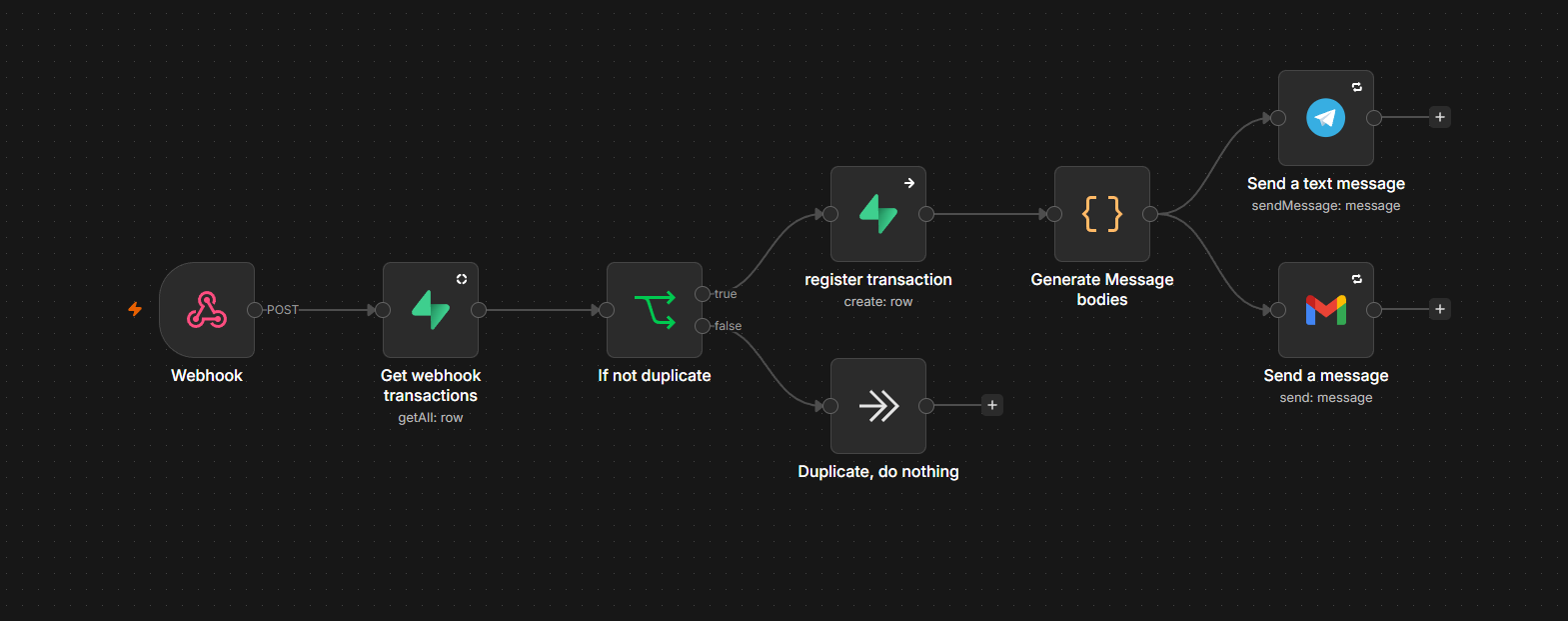
2. Acceptance & invoice email. Flipping an order to “Accepted” in the admin dashboard fires a second webhook, and n8n sends the customer an itemized HTML invoice — line items, subtotal, required deposit, and one-click links to whichever payment apps the business already uses to get paid. This replaces the step where she would otherwise sit down and hand-write a payment request: acceptance and invoicing become the same action instead of two.
3. Post-pickup review request. A scheduled trigger runs every morning, queries the database for orders picked up the day before, and emails each of those customers a review-request link. Nobody has to remember to ask — happy customers get asked automatically, on a fixed schedule, whether or not the owner thought about it that day.
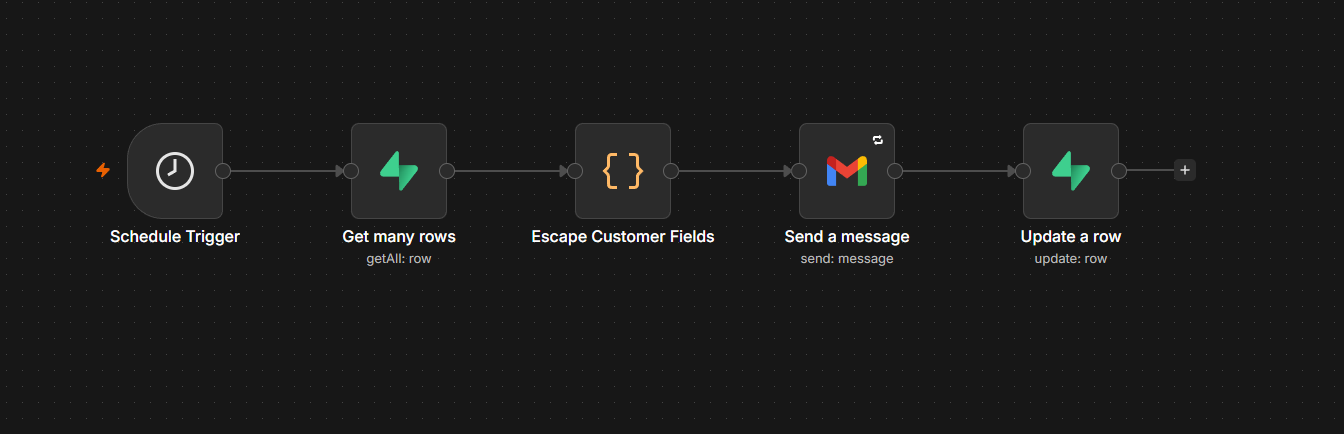
The common thread: none of this logic lives in the website’s codebase. The site only knows how to sign and fire two webhook events; everything downstream — which payment apps to link, what the emails look like, when review requests go out — is a workflow the business (or their agency) can edit without a deploy. Swapping Venmo for Stripe, or email for SMS, is an afternoon in the n8n editor, not a pull request.
Security model
A single-admin tool that touches customer PII, order data, and image uploads still needs real security engineering — it just needs to be proportionate. What’s actually implemented:
| LAYER | CONTROL | MITIGATES |
|---|---|---|
| Admin auth | Signed, expiring session cookie (HMAC, httpOnly/secure), constant-time comparison on password and signature |
Session forgery, cookie tampering, timing side-channel attacks |
| Route guard | Single middleware choke point gating every /admin/** route |
Forgetting auth checks on a new admin route |
| Public form | Honeypot field + minimum time-on-form check + Cloudflare Turnstile, fail-closed | Scripted bot submissions, without a visible CAPTCHA wall for real customers |
| Pricing integrity | Every total re-priced server-side from the database; client-submitted prices never trusted | Cart/price tampering |
| Business rules | Service-area and product-availability re-checked server-side against live settings | Bypassing “local pickup only” or ordering discontinued items via a crafted request |
| Automation handoff | Outbound webhooks signed with a short-lived HS256 JWT | A leaked webhook URL being used to inject fake orders into the invoicing automation |
| File uploads | MIME allowlist, 5MB cap, server-generated object keys, upload endpoint behind admin auth | Arbitrary file hosting, storage abuse, path traversal via crafted filenames |
| Data access | Database RLS enabled on every table with zero policies — only a server-only service-role key can read or write | Any client-side credential leak defaulting to zero access instead of broad access |
| Secrets | All secrets read server-side through one env abstraction, never shipped to the browser | Secret leakage into client bundles |
The honest gap: there’s no application-level rate limiting on the order-submission or admin-login endpoints beyond Turnstile — that’s left to platform-level protection (Cloudflare WAF rules), which is a reasonable default at this scale but worth stating outright instead of implying it’s handled. Offloading rate limiting to Cloudflare’s WAF keeps the codebase lean and keeps the database’s free tier from absorbing bot traffic it doesn’t need to.
Tech stack — and why
Every choice here optimizes for the same constraint: a non-technical single admin and a thin margin business that can’t absorb hosting or SaaS fees that scale with usage.
| CHOICE | WHY IT FITS THIS BUILD | MORE COMMON ALTERNATIVE | WHERE THE ALTERNATIVE ACTUALLY WINS |
|---|---|---|---|
| Astro (server output) | Ships near-zero JS by default; server rendering is needed for real checkout validation, not just static pages | Next.js / Remix | Larger hiring pool, more mature ecosystem — better if the app later needs to become a heavily interactive SPA |
| Cloudflare Pages + Workers | Free tier covers this traffic entirely; no servers to patch; same account as R2 and Turnstile | Vercel / Netlify | Smoother DX for preview environments and framework auto-detection; the default expectation for most frontend agencies |
| Supabase (Postgres) | Real relational schema for genuinely relational data (orders → line items → products); generous free tier; usable table editor for a non-technical admin | Firebase / PlanetScale / Neon | Firebase trades away relational integrity this app needs; Neon/PlanetScale are leaner “boring Postgres” if you don’t want Supabase’s unused auth/storage surface |
| Cloudflare R2 | Zero egress fees on a photo-heavy, repeatedly-browsed catalog — a direct, quantifiable cost win at this use case | AWS S3 + CloudFront / Cloudinary | S3 has deeper tooling; Cloudinary adds on-the-fly image transforms this build doesn’t currently use but might be worth paying for later |
| Cloudflare Turnstile | Free, invisible to legitimate customers, same dashboard as hosting | Google reCAPTCHA / hCaptcha | reCAPTCHA has the largest fraud-signal dataset; hCaptcha is the closer privacy-conscious peer if the client isn’t otherwise on Cloudflare |
| n8n | Self-hostable near-zero cost regardless of order volume; supports the JWT-signed webhook pattern the security model depends on | Zapier / Make.com | Zero hosting/maintenance burden and a larger pre-built integration library — the better choice if nobody wants to own an n8n instance’s uptime |
| Zod | One schema that’s simultaneously the runtime guard and the TypeScript type — keeps a per-client fork’s validation and types from drifting apart | Yup / manual validation | Not a meaningfully different tradeoff at this scale; Zod’s TS-inference is simply the more modern default |
Outcome
RD Creations went from DMs-and-a-notebook to a spam-guarded intake form and a dashboard my wife checks once a day. Every order is priced server-side, every status change is visible at a glance, and payment gets tracked as it actually happens — out-of-band, the way these small operations really run.
What I haven’t tested beyond this
One build, one bakery. I don’t know how this holds up against a catalog with real SKU-level variants or a service area spanning a hundred towns instead of a handful — those are the boundaries where this architecture would need to change.
If you’ve hit this same wall tracking orders across DMs, texts, and a notebook, reply and tell me what actually worked for you.